 By
By You sent a message you shouldn’t have — maybe it went to the wrong person, or you included information you didn’t mean to share, or you just regret sending it. WhatsApp’s Delete for Everyone feature gives you a second chance, but there are important time limits and caveats you need to understand.
How to Delete a Message for Everyone
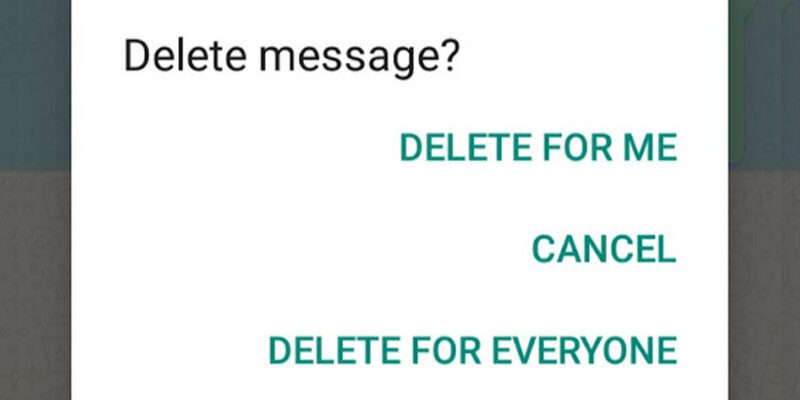
Long-press the message you want to delete in the chat. A toolbar will appear at the top of the screen. Tap the trash or delete icon. You’ll see three options: Delete for Me (removes it only from your device), Delete for Everyone (removes it from all participants’ devices), and Cancel. Tap Delete for Everyone. The message is replaced with This message was deleted in all recipients’ chats.
The Time Limit: How Long Do You Have?
WhatsApp previously allowed only 7 minutes for deletion. That window has been significantly extended over updates and as of 2026 allows deletion for up to approximately 60 hours (about 2.5 days) after sending. This is a major improvement over the original limit. However, if a recipient opened and read the message, saw a notification preview, or took a screenshot before you deleted it, the information is already out.
Can They Still See the Message After Deletion?
If the message was delivered and their notification preview was enabled, they may have seen the content in the notification banner before you deleted it. The deletion removes the message from the chat window but cannot recall a notification that already appeared. Some phones also have notification history features that log notification text even after it disappears.
Delete for Everyone in Group Chats
The same process applies in group chats — long-press the message and select Delete for Everyone. The message will show as deleted for all group members. Note that group admins can delete any member’s messages in some versions, while regular members can only delete their own.
What Happens When You Can’t Delete Anymore
Once the time window has passed, Delete for Everyone is no longer available — only Delete for Me. At that point, the message still exists on the recipient’s device. Your options are to contact the person directly and explain the situation, or if it was in a group, ask an admin to delete it if the admin version of deletion is available.
Disappearing Messages as a Prevention Strategy
If you regularly send sensitive information in certain chats, consider enabling Disappearing Messages. Open the chat, tap the contact or group name, and select Disappearing Messages. Choose 24 hours, 7 days, or 90 days. All messages in that chat will auto-delete after the chosen period — both yours and theirs.
Views: 184

You may also like

How to Use Your Phone to Stay Financially Organised During a Life Event

How to Use Your Phone to Stay Motivated When You Feel Like Giving Up

How to Use Your Phone to Get More From Your Doctor’s Appointments
More in:Apps

How to Use Your Phone to Find a Therapist or Mental Health Support

How to Keep Kids Safe Online When They’re Using Your Phone

The Best Free Apps That Replace Paid Subscriptions You’re Probably Wasting Money On

TecRounder is a blog that shares New Technology news from around the world (hence the name TecRounder), including the most recent mobile and gadget information: smartphone features, specifications, and more. You can find the latest technology updates here, including the most recent information on smartphones, laptop computers, and other electronic devices.