How to Clean Your Android Charging Port Without Damaging It
 By
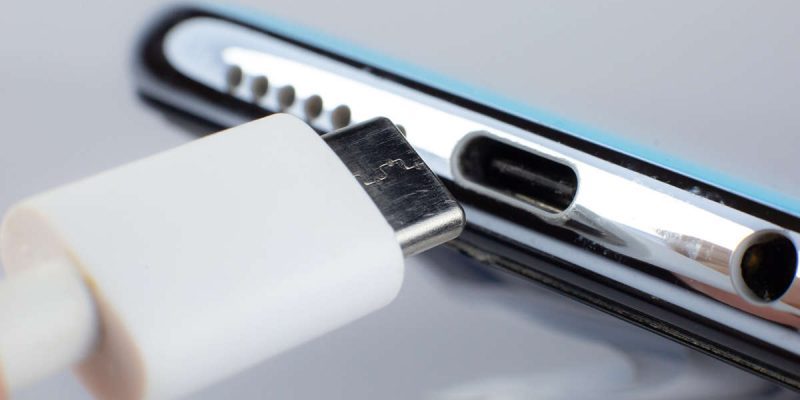
Your charger used to click in firmly. Now the cable feels loose, charging cuts in and out, and you find yourself holding the phone at a certain angle just to keep it going. If that sounds familiar, there is a good chance your charging port is full of dirt.
This is one of the most common hidden problems on any phone, and it is also one of the easiest to fix. This guide shows you how to clean your Android charging port safely, what to use, what to avoid, and how to keep it clean afterward. You will not need any special tools, and it takes about five minutes.
Why charging ports get dirty
Think about where your phone spends its life. In your pocket, in a bag, on a desk, in the car. Every time, tiny bits of fabric, dust, crumbs and sand get pressed into the open port. Each time you plug in a cable, it packs that debris a little deeper.
Over weeks and months, it forms a compact layer at the bottom of the port. The cable can no longer reach the metal contacts properly. The result is slow charging, a connection that keeps dropping, or a phone that does not charge at all.
Signs your charging port needs cleaning
- The cable feels loose or does not click in like before.
- Charging only works when the cable is held at an angle.
- Charging is slower than it used to be, even with a good charger.
- The phone connects and disconnects repeatedly while plugged in.
- You can see grey or brown fluff when you shine a light into the port.
What you need
Keep it simple. You need a flashlight, such as the one on another phone, and a wooden or plastic toothpick. A soft, dry brush with very fine bristles, such as a clean anti-static brush, is a nice extra. Some people also use a short burst from a can of compressed air, which I will explain below.
What you should never use
This matters as much as the cleaning itself. Do not use metal objects such as pins, needles, paperclips or SIM ejector tools. They can scratch or bend the tiny contacts inside, and you could cause a short circuit. Do not pour liquids into the port. Do not blow into it with your mouth, since your breath carries moisture. And do not use sharp tools that could snap off inside the port.
Step-by-step: how to clean your charging port safely
- Turn the phone off. This protects the electronics while you work.
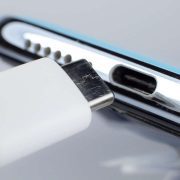
- Shine a flashlight into the port and look for debris. You will usually see a compacted layer of lint along the bottom.
- Take a wooden or plastic toothpick and gently scrape along the inside walls and the bottom of the port. Use light pressure, as if you were cleaning between your teeth.
- Be careful around the thin metal tongue in the middle of a USB-C port. It is delicate. Work around it, not against it.
- Lift out the lint a little at a time. Wipe the toothpick on a tissue as you go.
- Use a soft dry brush to sweep out any loose particles.
- If you have compressed air, hold the can upright, keep it a few inches away, and use short bursts only. Long or close blasts can force debris deeper or damage parts.
- Look again with the flashlight. Repeat if you still see debris.
- Turn the phone back on and plug in your cable. It should feel snug and start charging normally.
What if there is corrosion or green residue?
If you see green, white or dark residue on the contacts, the port may have been exposed to liquid. Do not scrape it hard. Take the phone to a repair shop, since corrosion can spread and cause serious damage. Some people use a tiny amount of high-percentage isopropyl alcohol on a cotton swab for light cleaning, with the phone off and fully dry afterward, but if you are not comfortable, let a professional handle it.
What if the port is still not working after cleaning?
If charging has not improved, try a different cable and charger to rule them out. If the port still feels loose or wobbly, or the connector looks bent or damaged, the port itself may be worn. A technician can replace it, and this is usually an affordable repair.
How to keep your charging port clean
- Avoid keeping your phone loose in pockets and bags with crumbs and lint. Use a clean pocket or a bag compartment.
- Clean the port gently every few months, or when you notice a change in charging.
- Choose a case that covers or protects the port opening, if you often spend time in dusty places.
- Consider a small dust plug if you work in a dusty or sandy environment.
- Keep your cables clean and replace damaged ones.
Common mistakes people make when cleaning a port
The biggest mistake is rushing. Digging hard with a pin might feel effective, but it can bend the contacts or snap the small tongue in a USB-C port, and that turns a free fix into a repair bill. Another mistake is cleaning with the phone still on and charging. Always switch the phone off and unplug it first. People also tend to stop after one pass. Lint packs in layers, so look again with the light after each round and keep going until the bottom of the port looks clean and shiny.
Finally, do not assume the cable is fine. If the port is clean and the problem continues, inspect the plug end of your cable. Lint can pack into the cable head too, and a bent or worn connector is just as capable of causing a loose, unreliable connection.
USB-C, micro-USB and why it matters
Most current Android phones use USB-C, which has a thin central tongue and a tight fit. It collects debris easily but is also easy to see into. Older phones use micro-USB, which is more fragile, and the small pins inside can bend with rough cleaning. Whatever type you have, the rule is the same: light pressure, wooden or plastic tools, and patience.
Final thoughts
A dirty charging port is one of those problems that quietly gets worse until your phone seems broken. Most of the time, a few minutes with a flashlight and a toothpick fixes it completely. Be gentle, stay away from metal, and your phone will charge like new, without a trip to the repair shop.
Frequently asked questions
Can I clean my Android charging port with a toothpick?
Yes, a wooden or plastic toothpick is one of the safest tools. Use light pressure and avoid pushing hard against the contacts.
Is compressed air safe for a phone charging port?
In short bursts from a few inches away, it is generally fine. Avoid long blasts at close range, which can push debris deeper.
How often should I clean my phone charging port?
Every two to three months is a good habit, or sooner if charging becomes loose, slow or unreliable.
Why does my phone charge only at a certain angle?
Usually lint is stopping the plug from seating fully, or the cable is worn. Clean the port and try a different cable.
Views: 0

You may also like
How to Clear Cache on Android Without Losing Anything
How to Find Which App Is Draining Your Android Battery
Why Your Android Phone Stops Charging at 80 Percent
More in:Gadgets
How Location Services Quietly Drain Your Android Battery
Does Factory Reset Make Android Faster? What to Know First.
Does Closing Apps Really Save Android Battery? The Truth

TecRounder is a blog that shares New Technology news from around the world (hence the name TecRounder), including the most recent mobile and gadget information: smartphone features, specifications, and more. You can find the latest technology updates here, including the most recent information on smartphones, laptop computers, and other electronic devices.