Why Your Android Phone Stops Charging at 80 Percent
 By
You plug in your phone, watch the number climb, and then it just stops at 80 percent. You unplug it, plug it back in, maybe try another cable. Same result. It is natural to assume something is broken, especially if you were counting on a full battery before a long day.
Here is the reassuring part. In most cases, your phone is doing exactly what it was designed to do. Many modern Android phones now include battery protection features that deliberately stop or slow charging at around 80 or 85 percent. This guide explains why, how to check whether that is what is happening, and what to do if it is not.
Is it normal for an Android phone to stop at 80 percent?
Often, yes. Lithium-ion batteries age fastest when they sit at very high charge levels, especially while warm. Sitting at 100 percent for hours puts the battery under extra stress. So phone makers added options that cap the charge or hold it back until you actually need it.
The tricky part is that these settings are sometimes switched on by default or turned on during setup, and people forget. A few weeks later, the phone seems to be misbehaving when it is actually following a rule you accepted without noticing.
Reason 1: A battery protection or charge limit setting is on
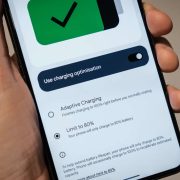
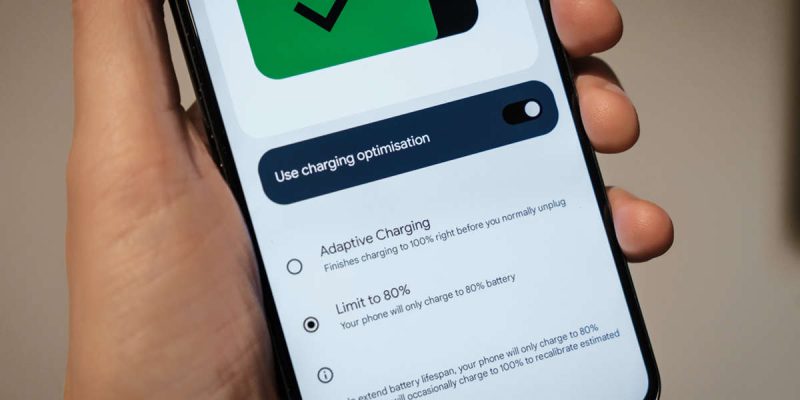
Some phones let you set a maximum charge, commonly 80 or 85 percent. Samsung Galaxy phones, for example, offer a Protect battery option, and recent Pixel phones offer a charging limit as well. The names vary by brand and software version, so search your settings for the word battery and look for terms such as Battery protection, Charge limit, Protect battery or Optimized charging.
If one of these is on and set to a limit, your phone will stop at that number every time. Turn it off, or raise the limit, and charge again to see whether it reaches 100 percent. If you want full charge only on certain days, you can switch it off when you need it and back on afterwards.
Reason 2: Adaptive or optimized overnight charging
Another common feature learns your routine. If you plug in at night and usually unplug around 7 a.m., the phone charges to a set level, waits, and then finishes the last stretch shortly before your alarm. This keeps the battery from sitting full for hours.
If you plug in at an unusual time, the phone may not recognize the pattern, and it may hold at 80 percent longer than you expect. Most phones show a message on the lock screen, such as charging optimized until a certain time. If you see something like that, you have found your answer. You can turn the feature off in battery settings, or on some phones tap the notification to charge fully right now.
Reason 3: The phone is too warm
Heat is the battery’s biggest enemy, so phones are built to protect themselves. If your phone becomes warm while charging, the software may pause charging or drop to a trickle until it cools. That can look like charging stopped at 80 percent.
This happens often when you charge in direct sunlight, in a hot car, under a pillow, in a thick case, or while gaming or streaming. Take off the case, move the phone to a hard, cool surface, and leave it alone for a while. If it climbs past 80 percent after cooling, heat was the cause.
Reason 4: The last 20 percent is slower by design
Charging is not a steady stream. A phone charges quickly while the battery is low, then slows down as it fills up to protect the cells. The final stretch, especially from 80 to 100 percent, can take as long as the first 50 percent.
So if your phone reached 80 percent and then seemed to freeze there, give it more time. Check again after 15 to 20 minutes. If the number is still not moving and you have no protection features on, keep reading.
Reason 5: Your battery is aging
As batteries wear out, the phone has a harder time reading how full they actually are. You may see odd behavior such as jumping from 80 to 100 suddenly, sitting at one number for a long time, or draining from 100 to 80 within minutes. This suggests the battery meter and the battery condition are not agreeing with each other.
If your phone is two to three years old or more, and you also notice poor battery life and random shutdowns, an aging battery is a likely cause. Many phones show battery health in settings or a diagnostics menu, and a service center can test it. A replacement battery is often much cheaper than a new phone.
Reason 6: A weak cable, charger or port
If your phone stops charging completely at 80 percent and the screen shows no charging icon, the problem may be the connection. A worn cable, a weak charger or lint in the charging port can cause charging to cut in and out. Try a different cable and charger, and check the port with a flashlight for lint.
Reason 7: A software glitch
Sometimes the battery reading or charging service gets stuck after an update. Restart the phone, make sure the system is up to date, and test again. If a recent update started the problem, look for a follow-up patch from the manufacturer.
How to check what is happening, step by step
- Look at the lock screen or notification shade while charging. Many phones tell you when charging is being limited or optimized.
- Open battery settings and look for charge limit, protection or adaptive charging options.
- Turn them off temporarily and charge again.
- Remove the case and move the phone somewhere cool.
- Try a different cable and charger.
- Restart the phone and install any pending updates.
- If the problem continues, check battery health and speak to a service center.
Should you leave battery protection on?
For most people, yes. If you leave your phone plugged in for long stretches, such as overnight or at a desk, a limit around 80 to 85 percent can help your battery last longer over the years. The trade-off is that you will have a little less battery on a given day. If you need a full charge for a trip or a long shift, turn the limit off for that day and turn it on again afterward.
Think of it like this. A battery that is slightly less full today can stay healthier for much longer, which can save you the cost and hassle of a replacement.
When to be concerned
Stopping at 80 percent is not dangerous by itself. But get your phone checked if it feels very hot, smells odd, looks swollen, or shuts down suddenly with plenty of battery shown. Those are signs of a failing battery, and they should not be ignored.
Final thoughts
A phone that stops at 80 percent feels like a defect, but it is usually a feature you forgot you had. Check your battery settings first, then think about heat, cables and age. In most cases you will find the reason in less than five minutes, and you will know whether to leave it alone or change a setting.
Frequently asked questions
Why does my phone stop charging at 80 percent?
The most common reason is a battery protection or adaptive charging feature that limits charging to protect battery health. Heat can also pause charging.
How do I make my Android charge to 100 percent?
Turn off the charge limit or adaptive charging in your battery settings, keep the phone cool, and use a good cable and charger.
Is it bad to charge to 100 percent?
It is not harmful on an occasional basis. But keeping a battery full for long periods, especially in warm conditions, can speed up wear.
Does stopping at 80 percent mean my battery is bad?
Not necessarily. If a protection setting is on, the stop is intentional. A bad battery usually shows other signs, such as fast drain, heat and unexpected shutdowns.
Views: 0

You may also like
How Location Services Quietly Drain Your Android Battery
Does Factory Reset Make Android Faster? What to Know First.
Does Closing Apps Really Save Android Battery? The Truth
More in:Gadgets
Do Cleaner and Booster Apps Work on Android? The Honest Truth
Dark Mode and Battery Life: How Much Does It Really Save
Android Storage Almost Full? What to Delete First

TecRounder is a blog that shares New Technology news from around the world (hence the name TecRounder), including the most recent mobile and gadget information: smartphone features, specifications, and more. You can find the latest technology updates here, including the most recent information on smartphones, laptop computers, and other electronic devices.