How Much RAM Does Your Android Really Need in 2026
 By
You are shopping for a new phone, or wondering why your current one struggles, and the specs sheet keeps throwing numbers at you. 4 GB, 8 GB, 12 GB, 16 GB. Everyone seems to have an opinion, and the marketing makes it sound as if more RAM is always better. But how much do you actually need?
This guide explains what RAM does in simple terms, how much is enough for different kinds of people, and why more is not always better. By the end, you will be able to read a spec sheet with confidence and avoid paying for something you do not need.
What is RAM, in plain words?
RAM is your phone’s short-term memory. It holds the apps and data you are using right now so the processor can reach them quickly. Think of it as the size of your desk. A bigger desk lets you keep more things open and in reach, while a small desk means you have to put things away to make room.
RAM is not the same as storage. Storage, such as 128 GB or 256 GB, is where your photos, apps and files live long term. RAM is temporary, and clears when you restart the phone.
What happens when you run out of RAM?
When RAM fills up, Android closes the apps you have not used recently to make room. Later, when you return to one of those apps, it has to reload from the start. You may see this as lag, a refresh of the page you were on, or a lost game level. On phones with very little RAM, this happens constantly, and the phone feels slow.
A practical guide to how much RAM you need
These are rough guides, and real-world performance also depends on the processor, software and how well the phone is built.
3 to 4 GB: basic use
This can handle calls, messaging, light social media and simple browsing. But modern apps are hungry, so expect some slowness and frequent app reloads, especially if you switch between many apps. It is workable for a budget or backup phone, but not a comfortable choice for heavy users.
6 GB: everyday comfort
This is a sensible level for many people. It handles social media, streaming, navigation, messaging and light gaming with fewer reloads. A phone with 6 GB should feel reasonably smooth for several years of regular use.
8 GB: smooth and future-friendly
This is a comfortable sweet spot for many users. It supports heavy multitasking, bigger games, photo editing and a longer lifespan, since apps tend to need more memory over time.
12 GB and above: power users
This suits people who play demanding games, edit video, run many apps at once or want the phone to last as long as possible. For most people, anything above 12 GB brings little noticeable gain in day-to-day use.
Why more RAM is not always better
It is tempting to buy the biggest number, but RAM is only one part of the picture. A phone with a fast processor, good software and 8 GB can feel smoother than a poorly optimized phone with 12 GB. The software side matters as much as the hardware.
Extra RAM also costs money and can use a little more power. If you mostly message, browse and watch videos, paying for 16 GB is probably a waste. Better to spend that money on a good battery, a better screen or more storage.
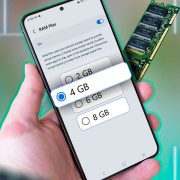
What about virtual RAM or RAM Plus?
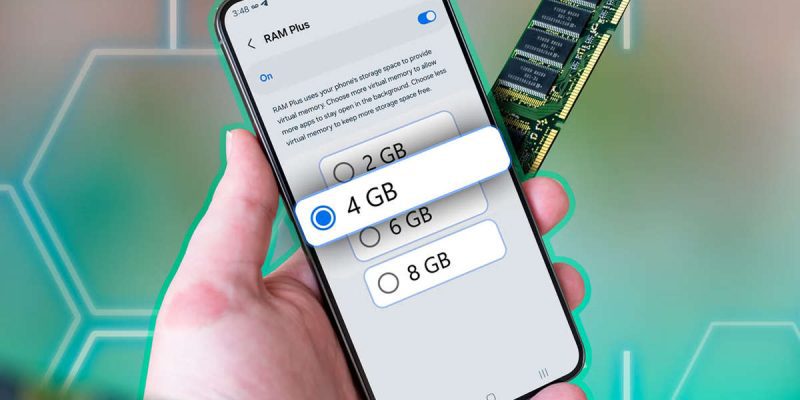
Some phones advertise extra virtual RAM, which borrows some of your storage and uses it like memory. It can help slightly in some cases, but storage is much slower than real RAM, so it is not a replacement. Do not treat virtual RAM as if it adds real memory.
How to check how much RAM your phone has
Open Settings, then About phone, and look for RAM or Memory information. Some phones show it in the specifications, or under Device care or Memory. You can also look it up on the manufacturer’s website using your model name.
How to check how much RAM is being used
Some phones show memory use under Settings, Device care or Developer options, then Running services or Memory. This can show what is using the most. If your memory is almost always full, and you notice slowdowns, you might benefit from removing apps or considering a phone with more RAM.
Can you free up RAM on a phone you already have?
You cannot add physical RAM, but you can reduce how much your phone uses.
- Uninstall apps you do not use.
- Restrict background activity for apps that you rarely open.
- Turn off unnecessary widgets and live wallpapers.
- Restart the phone every week.
- Avoid RAM booster apps, which usually make things worse.
What matters besides RAM when buying a phone
- The processor, which decides how fast the phone can think.
- Storage type and size, since fast storage speeds up app loading.
- Software support, such as how many years of updates it receives.
- Battery size and health.
- Screen quality, which you see every day.
Which RAM size should you choose?
If you want the simple answer, for most people in the coming years, 6 to 8 GB is a good balance. If your budget is tight, 4 GB can work, but expect compromises. If you game or edit video, aim for 8 GB or more. And if you want a phone to last four or five years, leaning toward the higher side gives you more breathing room.
How your habits change the answer
Think about what you actually do on your phone. If you mostly message, scroll and take photos, you will not feel much difference between 6 GB and 12 GB. If you often switch between many apps, keep dozens of browser tabs open or play large games, the extra memory helps. The right amount of RAM is the one that fits your habits, not the one that wins on a spec sheet.
Does RAM affect how long a phone lasts?
Somewhat. Apps and software tend to grow more demanding over time, so a phone with more RAM today often stays comfortable for longer. A phone with only 4 GB may feel fine at first, but may struggle two or three years later. If you want to keep a phone for a long time, choosing a bit more RAM than you need today is a sensible hedge.
Questions to ask before you buy
- How many years of updates will this phone get?
- What processor does it use, and how does it perform in real reviews?
- Is the storage fast, and how much do I need?
- Does the phone feel smooth in a store or in reviews, not just on paper?
Final thoughts
RAM matters, but it is not magic. Think about how you use your phone, choose a sensible amount, and pay attention to the processor, software and battery as well. You will end up with a phone that feels good in daily life, without paying for specs you will never feel.
Frequently asked questions
Is 4 GB RAM enough for Android?
It can work for basic use, but modern apps may feel slow, especially with multitasking.
Is 8 GB RAM good?
Yes, it is a comfortable level for most people and should last several years.
Does more RAM make a phone faster?
Only up to a point. Beyond what you need, extra RAM adds little. The processor and software also matter.
Can I upgrade the RAM in my phone?
No. Phone RAM is built into the device and cannot be upgraded.
Views: 0

You may also like
How to Clean Your Android Charging Port Without Damaging It
How to Clear Cache on Android Without Losing Anything
How to Find Which App Is Draining Your Android Battery
More in:Gadgets
Why Your Android Phone Stops Charging at 80 Percent

How Location Services Quietly Drain Your Android Battery
Does Factory Reset Make Android Faster? What to Know First.

TecRounder is a blog that shares New Technology news from around the world (hence the name TecRounder), including the most recent mobile and gadget information: smartphone features, specifications, and more. You can find the latest technology updates here, including the most recent information on smartphones, laptop computers, and other electronic devices.