How to Extend Your Phone’s Screen Brightness in Bright Sunlight
 By
By Trying to read your phone in direct sunlight is one of the most consistently frustrating smartphone experiences. You crank the brightness to maximum, angle it every which way, and still can’t make out more than a washed-out blur. Meanwhile, someone with an older phone next to you seems to read theirs just fine.
Here’s what actually determines outdoor visibility and how to maximize it.
Peak Brightness vs Sustained Brightness
Most phones have two brightness modes: standard maximum brightness and a “peak” or “boost” brightness that’s significantly higher but only activates automatically in bright light. This peak brightness is often 1.5 to 3 times the standard maximum — it’s what manufacturers list as “up to X nits” in the specs.
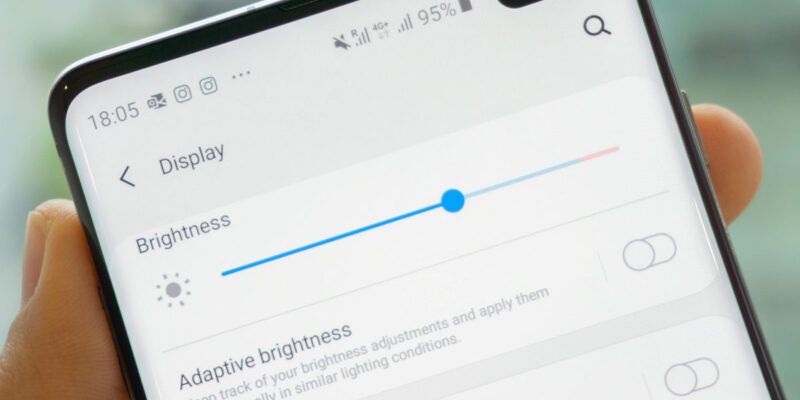
The key word is “automatically.” The phone’s ambient light sensor triggers this boost mode when it detects extremely bright conditions. You can’t manually enable it on most phones — you have to let the sensor trigger it. So make sure auto-brightness is enabled (this is the exception to the usual advice to disable it): Settings > Display > Adaptive Brightness (Android) or Settings > Accessibility > Display & Text Size > Auto-Brightness (iPhone).
Manual Tweaks That Help
Turn off any “Eye Comfort” or “Blue Light Filter” modes. These reduce blue light and make the screen warmer, which looks fine indoors but significantly reduces perceived brightness and clarity outdoors.
Enable “Extra Brightness” or “Sunlight Mode” if your phone has it. Some Samsung phones have this under Settings > Display. It boosts brightness beyond the normal slider maximum in outdoor conditions.
Increase display contrast settings where available. Higher contrast makes text readable at lower absolute brightness.
Physical Strategies
The most reliable sunlight visibility trick costs nothing: shade. Cupping your hand over the top of the phone to shade the screen from direct light works better than any brightness setting. Move to a shaded area even partially — under a tree, the awning of a shop, or simply turning your back to the sun so you’re casting a shadow onto the phone.
Screen orientation matters too. If you can angle the phone so direct sunlight doesn’t hit it head-on, reflections reduce dramatically. Glare is a bigger readability problem than raw brightness.
Antiglare Screen Protectors
Matte antiglare screen protectors reduce the direct reflection of sunlight, which is often the main readability problem. They sacrifice some color vibrancy and sharpness (the matte surface softens the image slightly), but they make outdoor use significantly more comfortable. If you spend a lot of time outdoors reading your phone, a matte protector is worth considering.
Phone Specs That Actually Make a Difference
If you’re buying a phone and outdoor visibility matters to you, look at peak brightness specs. Phones rated above 2000 nits peak brightness are noticeably better outdoors than ones rated below 1000 nits. Recent Samsung Galaxy S Ultra models, iPhone Pro models, and Google Pixel Pro models all have high peak brightness designed for outdoor use. Budget phones often have display panels that simply cannot produce enough light to be comfortably usable in direct sunlight.
The E-Ink Alternative for Reading
If you frequently read outdoors — news, ebooks, articles — e-ink devices like Kindle are fundamentally better suited to outdoor reading than any smartphone. E-ink is a reflective display technology that’s actually more readable in brighter light, the opposite of OLED and LCD. It’s not practical for everything, but if outdoor reading is a specific use case that matters to you, it’s worth mentioning.
Views: 45

You may also like
How to Teach Your Children About Phone Safety Without Them Tuning You Out
How to Use Your Phone to Create Content for Social Media Without It Taking All Day
How to Make Your Phone Work Better in Rural Areas With Poor Signal
More in:Gadgets
How to Use Your Phone to Track and Improve Your Posture
How to Use Your Phone to Become a Better Writer

How to Use Your Phone to Find a Therapist or Mental Health Support

TecRounder is a blog that shares New Technology news from around the world (hence the name TecRounder), including the most recent mobile and gadget information: smartphone features, specifications, and more. You can find the latest technology updates here, including the most recent information on smartphones, laptop computers, and other electronic devices.