Why Does My Phone Get So Hot When I’m Not Even Using It?
 By
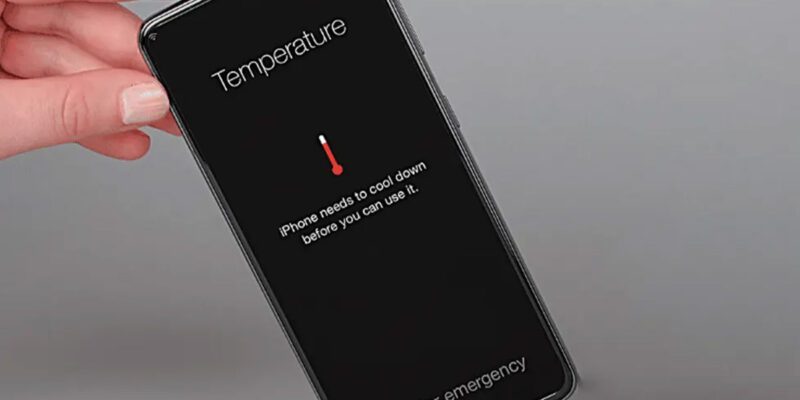
By You pick up your phone from the table where it’s been sitting untouched for an hour, and it’s uncomfortably warm. That’s not normal and it’s not nothing. A phone that runs hot at idle is doing something — and whatever it’s doing is draining your battery and potentially damaging it at the same time.
The good news is that in most cases the culprit is a specific app or process, and once you find it, the fix is straightforward.
What’s Happening Inside When It Gets Hot
Heat is a byproduct of your phone’s processor doing work. When the screen is off and you’re not interacting with the phone, the processor should be in a low-power sleep state. If it’s generating heat, something is preventing that sleep state. A background process is running — actively using the CPU, making network requests, processing data, or doing something it shouldn’t be doing when the phone is supposed to be idle.
The Most Common Causes
App updates downloading in the background are one of the biggest culprits. When you’re connected to Wi-Fi, your phone may be downloading multiple large app updates simultaneously, which drives up both processor and network radio usage. Check whether auto-updates are happening by opening the Google Play Store or App Store and looking at the downloads section.
Location services can keep your phone warm. Apps set to “Always” location access periodically poll your GPS and cellular towers for your position, even when you’re not using them. Delivery apps, social media, weather apps, and fitness trackers are common offenders. Go through your location permissions and change everything from “Always” to “While Using” unless you have a specific reason for constant background location.
A misbehaving app is probably the most common cause overall. Apps occasionally get into states where they loop or crash repeatedly, consuming CPU every few seconds without the user ever seeing it. This is especially common right after an app update, right after an OS update, or when an app tries to sync and encounters an error it keeps retrying.
How to Find the Specific Problem
On Android, go to Settings > Battery > Battery Usage. Look at what’s consumed battery over the last few hours and specifically look for anything with high “Background Activity.” If you see an app consuming significant battery when you haven’t used it, that’s your culprit.
On iPhone, go to Settings > Battery and scroll down. Look at apps showing high percentages and specifically check the “Background Activity” column. Anything running heavily in the background while you’re not using the phone is worth investigating.
The Quick Test
Enable Airplane Mode for 30 minutes and see if the phone stays cool. Airplane Mode cuts all wireless radios — no cellular, no Wi-Fi, no Bluetooth. If the phone stays cool in Airplane Mode but heats up when you reconnect to the network, the problem is network-related background activity. If it still heats up in Airplane Mode, something is consuming the CPU regardless of network access.
Specific Things to Check and Change
Background App Refresh on iPhone (Settings > General > Background App Refresh) allows every app to check for updates in the background. Turn it off system-wide or for specific apps you don’t need updating constantly.
On Android, go to Settings > Battery > Adaptive Battery and make sure it’s enabled. This feature learns which apps you actually use and restricts background activity for ones you rarely open.
Disable background sync for accounts you don’t need constantly updating. Social media accounts syncing every few minutes add up across several apps.
Check whether your phone is trying to sync a large amount of data — photos backing up to iCloud or Google Photos, for example, can generate significant heat. Look at whether a cloud sync is in progress when the phone feels warm.
If Nothing Obvious Explains It
A recently installed app is often the answer for sudden onset unexplained heat. Think about what you installed in the last week. Uninstall it and see if the problem resolves.
If you’ve had the phone for two or more years, an aging battery can generate more heat during normal operation than a new one would. This is worth checking with a battery health diagnostic.
In rare cases, particularly after a major OS update, the system does extended indexing and processing in the background for a day or two. If the heat started immediately after an update and the phone has been settling down over a few days, that’s likely what’s happening. It should resolve on its own within 48 hours.
Views: 67

You may also like

How to Use Your Phone to Learn Basic First Aid You Might Actually Need

How to Use Your Phone to Create a Morning Routine That Actually Works

How to Handle Phone Anxiety and the Constant Pressure to Be Available
More in:Gadgets

How to Use Your Phone to Plan and Track Your Garden or Allotment

How to Stop Your Kids From Spending Money on Your Phone by Accident

How to Use Your Phone to Manage Your Time When You Work From Home

TecRounder is a blog that shares New Technology news from around the world (hence the name TecRounder), including the most recent mobile and gadget information: smartphone features, specifications, and more. You can find the latest technology updates here, including the most recent information on smartphones, laptop computers, and other electronic devices.