How to Use Your Phone to Stay Safe and Informed During Bad Weather
 By
By Severe weather events — storms, flooding, extreme heat, ice, and in some regions more extreme events like tornadoes or wildfires — have become more frequent and more intense. The margin of time between early warning and serious danger is often measured in hours or less. Having the right phone tools and settings in place before severe weather arrives can be the difference between safety and crisis.
Weather Alerts: What to Enable
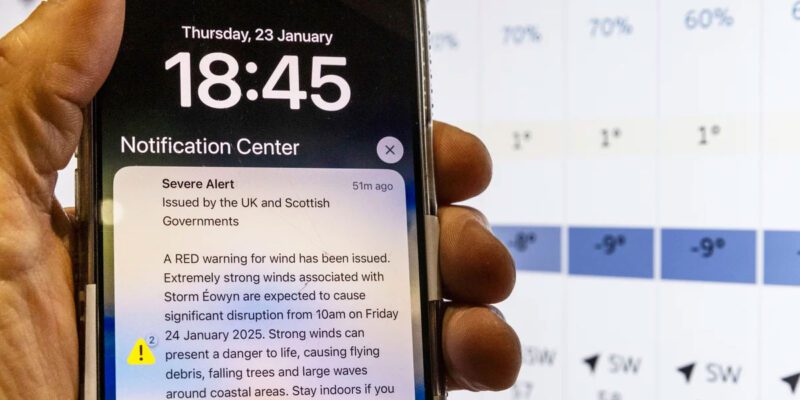
Both iPhone and Android receive Wireless Emergency Alerts (WEAs in the US, Cell Broadcast Alerts in the UK) for severe and extreme weather without needing any special app. These cannot be disabled for the most serious alerts. Verify they’re enabled:
iPhone: Settings > Notifications > scroll to the bottom to find Emergency Alerts and Government Alerts — enable both.
Android: Settings > Notifications > Advanced Settings > Wireless Emergency Alerts (location varies by manufacturer).
These alerts are geographically targeted — you only receive them when your phone is in the affected area.
Apps for Early Warning
The Met Office (UK) and NOAA/National Weather Service (US) apps provide official forecasts with severe weather warnings. The Met Office app includes rain radar and weather warnings with specific timing.
Weather Underground and Weather.com apps provide hyperlocal forecasts that can be more accurate than national service forecasts for your specific location.
For flooding specifically: the Environment Agency (EA) Flood Risk in England tool and the Met Office flood alerts are essential for anyone in a flood-risk area. Set up flood warnings for your specific area at gov.uk/sign-up-for-flood-warnings — these are sent by text or email.
Preparing Before Severe Weather
When severe weather is forecast, your phone gives you 12-48 hours to prepare. Key practical preparations:
Charge your phone to 100% and charge any portable battery packs.
Download offline maps for your area — if cellular networks go down during an event, offline maps continue to work for navigation.
Screenshot or save key emergency contact information including your local authority’s emergency number, your power network operator’s power outage number, and nearest emergency shelter if relevant.
Take photos of your property before significant storms — useful for insurance claims if damage occurs.
Know your home’s vulnerabilities: if you’re in a flood risk area, know where your stopcock and electrical panel are. If in a storm-prone area, know where your emergency supplies are.
During Severe Weather
Follow local authority social media accounts during active events — Twitter/X and Facebook are where emergency services post real-time road closures, evacuation orders, and updates during events.
The BBC (UK) and NOAA Weather Radio (US) provide continuous updates during events. BBC Sounds app provides live BBC radio that works even when internet is slow, as audio requires less bandwidth than video.
If you need to go out during severe weather: share your location with a trusted contact and agree to check in at regular intervals. Enable location sharing for the duration of the event.
After Severe Weather
Report flood damage to your local authority and your insurance company immediately — photographs taken immediately after damage are important for claims.
Do not return to a flooded property until it’s declared safe by emergency services — floodwater is contaminated with sewage and may have compromised electrical systems.
For power outages: your phone’s battery is your communication lifeline. Minimise battery use during the outage (reduce brightness, disable features you don’t need) and use your portable battery pack strategically.
Views: 27

You may also like

How to Use Your Phone to Learn About Nutrition Without Getting Confused

How to Use Your Phone to Document and Share Your Creative Work

How to Use Your Phone to Prepare for a Job Interview
More in:Gadgets

How to Use Your Phone to Manage Your Pet’s Health Records and Vet Visits

How to Use Your Phone to Deal With Information Overload
How to Use Your Phone to Learn Basic First Aid You Might Actually Need

TecRounder is a blog that shares New Technology news from around the world (hence the name TecRounder), including the most recent mobile and gadget information: smartphone features, specifications, and more. You can find the latest technology updates here, including the most recent information on smartphones, laptop computers, and other electronic devices.