How to Stop Google From Tracking Everything You Do
 By
By Google’s entire business model is built on knowing things about you. The more it knows — what you search, where you go, what you watch, what you buy — the more precisely it can target advertising. This is the trade you make for free search, free Maps, free Gmail, and free everything else Google offers.
The trade is worth it for many people. But it’s worth understanding what you’re giving away and taking control of the parts that bother you most.
My Activity: The Most Important Page You’ve Never Visited
Go to myactivity.google.com. What you see there will probably surprise you. Every search, every YouTube video, every Google Assistant query, every website you visited in Chrome while signed in, every place Google Maps has tracked you going — it’s all there, organized in a timeline going back years.
This is both impressive and disconcerting. Take a few minutes to scroll through it. Understanding what Google actually has is the foundation of deciding what you want to change.
Turn Off the Main Data Collection Toggles
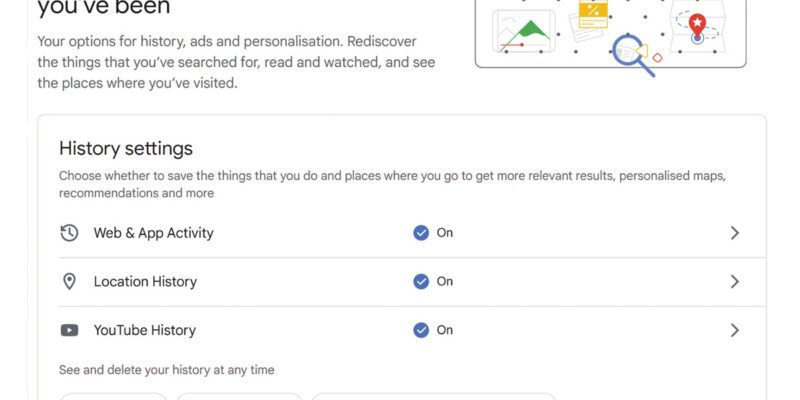
At myaccount.google.com, go to Data & Privacy. Here you’ll find the controls for three main data types:
Web & App Activity: Saves your searches and browsing history. Turning this off stops Google from recording new activity. You can also set auto-deletion to delete data after 3 or 18 months automatically.
Location History: Records everywhere you go when you have your phone. Turning this off stops new location data from being saved. Setting auto-deletion removes historical data on a rolling basis.
YouTube History: Records what you watch and search on YouTube. This affects your recommendations — without watch history, recommendations become much less personalized but also less algorithmically manipulative.
Turning off these controls doesn’t delete existing data — it just stops new data from being collected. To delete existing data, go back to myactivity.google.com and delete what’s there.
Ad Personalization
Go to myaccount.google.com > Data & Privacy > Ad Settings > Ad Personalization. You can turn this off entirely. You’ll still see ads on Google properties and across the web, but they won’t be targeted based on your activity profile. Many people find that once they’ve turned this off, they don’t actually notice worse ads — Google’s contextual advertising based on the page you’re viewing still works without the behavioural profile.
Google Photos and Gmail
Google uses your photos for its AI features and training. Google uses your email content for contextual advertising. If either of these concerns you, note that the opt-out for Google reading your Gmail is largely historic at this point — Google says it no longer uses Gmail content for ad targeting. For Google Photos, the AI features (face recognition, scene recognition) use your photos on-device or with the privacy of your account, not for general training purposes, according to Google’s current policy.
Using Google Services With More Privacy
You can search Google while signed out of your account — this disconnects your searches from your personal data profile. Using Incognito mode in Chrome also prevents searches from being associated with your signed-in account (though your IP address is still visible to Google).
Firefox with Google as the search engine is a middle ground — you get Google’s search quality without Chrome’s additional data collection.
For completely private search, DuckDuckGo or Startpage don’t track search history at all.
The Balance to Strike
Full Google account deletion isn’t realistic for most people who use Gmail, Google Calendar, Google Maps, and Android. The more realistic goal is disabling the data collection that you find most intrusive — location history and activity tracking are the top candidates — while keeping the services you actually use.
Views: 22

You may also like

How to Use Your Phone to Learn About Nutrition Without Getting Confused

How to Use Your Phone to Document and Share Your Creative Work

How to Use Your Phone to Prepare for a Job Interview
More in:Gadgets

How to Use Your Phone to Manage Your Pet’s Health Records and Vet Visits

How to Use Your Phone to Deal With Information Overload

How to Use Your Phone to Learn Basic First Aid You Might Actually Need

TecRounder is a blog that shares New Technology news from around the world (hence the name TecRounder), including the most recent mobile and gadget information: smartphone features, specifications, and more. You can find the latest technology updates here, including the most recent information on smartphones, laptop computers, and other electronic devices.