 By
By The internet is full of things worth reading. The problem is that they surface at inconvenient moments — while you’re working, commuting with intermittent signal, or about to go to sleep. Trying to find them again later is unreliable. Keeping ten browser tabs open on your phone is chaotic. And browser bookmarks are where interesting articles go to be forgotten.
Read-later apps solve this properly. Here’s how they work and which ones are worth using.
Pocket: The Standard
Pocket is the most widely used read-later service and for good reason — it’s well-designed, works across all platforms, has a genuinely good reading interface, and the free tier covers most people’s needs.
Save an article: tap the share button on any article in any browser or app, and select Pocket from the share menu. The article is saved to your Pocket list.
Read: open the Pocket app. Articles are presented in Pocket’s clean reading view — no ads, no clutter, just the text formatted for comfortable reading. They’re available offline once downloaded.
The free version includes unlimited saves and access on one device. Premium adds unlimited highlights, permanent library backup, and suggested articles.
Instapaper
Instapaper is Pocket’s main competitor, loved by users who prefer a more minimal reading experience. The reading interface is slightly cleaner than Pocket. It has strong text highlighting and note-taking features, which makes it useful not just for reading but for annotating.
The speed reading feature (increases reading pace by displaying words sequentially at adjustable speed) is useful if you have more saved articles than reading time.
Readwise Reader
Readwise Reader is the more sophisticated option that goes beyond saving articles. It imports newsletters directly (from your email), supports RSS feeds (to follow blogs and sites without social media), and has AI-powered highlighting and note-taking that syncs with note-taking apps like Obsidian and Notion.
For people who read a lot and want their reading to actually feed into their knowledge and work, Readwise Reader is in a different class from Pocket. It does require a subscription.
Built-In Options
Safari’s Reading List (iPhone): tap the Share button > Add to Reading List. Articles sync across Apple devices via iCloud and are available offline. Works well but is limited to Safari on Apple devices.
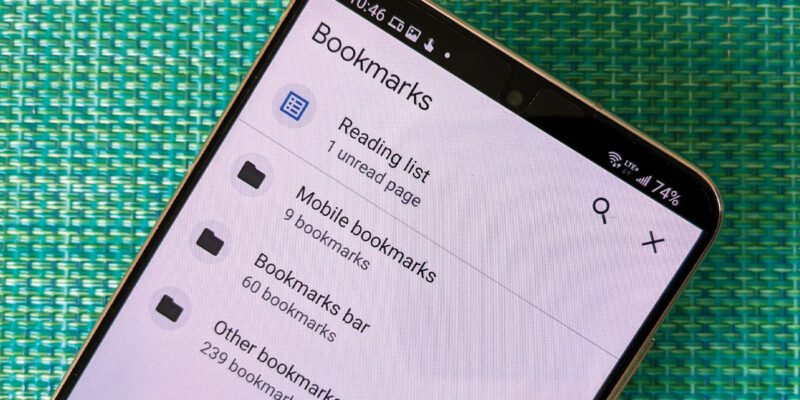
Chrome’s Reading List: three dots > Reading List. Available on Android and iPhone and syncs across Chrome instances.
These built-in options are fine for occasional use. For people who save articles regularly, a dedicated app is more comfortable and better organized.
Making Read-Later Actually Work
The trap of read-later apps is saving articles you never actually read. A few habits prevent this:
Be selective: save things you genuinely intend to read, not everything interesting. If you can’t be specific about when you’ll read it, the saving is probably procrastination.
Schedule reading time: 20 minutes on a morning commute, or a reading hour on Sunday afternoon. Read-later apps work best when there’s dedicated time for them.
Archive or delete: articles you’ve read should be archived (not just left in the unread list). Articles you save but realize you don’t want to read should be deleted. Keeping a clean queue makes the app feel like a curated magazine rather than a digital pile.
Views: 70

You may also like

How to Stop Your Kids From Spending Money on Your Phone by Accident

How to Use Your Phone to Manage Your Time When You Work From Home
How to Use Your Phone Camera to Spot Things You’d Otherwise Miss
More in:Apps

How to Use Your Phone to Build Better Habits That Actually Stick

How to Use Your Phone to Help You Through a Difficult Life Transition

How to Use Your Phone to Manage Your Mental Load and Stop Forgetting Things

TecRounder is a blog that shares New Technology news from around the world (hence the name TecRounder), including the most recent mobile and gadget information: smartphone features, specifications, and more. You can find the latest technology updates here, including the most recent information on smartphones, laptop computers, and other electronic devices.