
Is Your Android Battery Calibration Off? How to Fix Wrong Percentages
 By
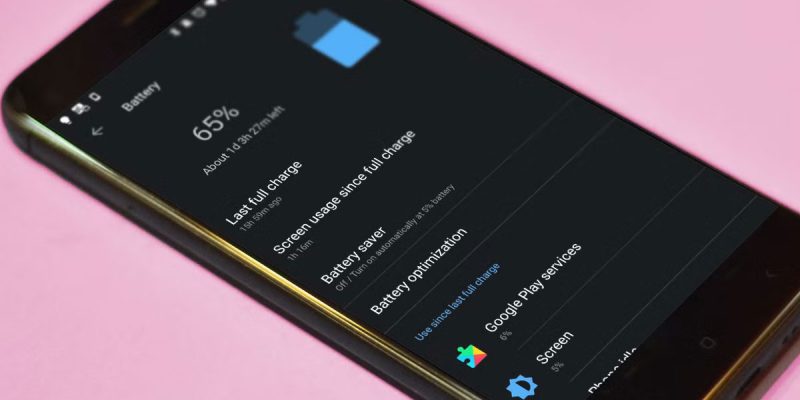
Your phone says 30 percent. A few minutes later it says 8. Or it sits at 1 percent for ages before shutting down. Or it charges to 100, then loses 10 percent in what feels like seconds. It is confusing, and it makes you wonder whether you can trust the battery number at all.
If your battery percentage seems to be lying, you may have what people call a calibration problem. This guide explains what that really means, what causes it, which popular tricks are myths, and the steps that actually help.
What does battery calibration mean?
Your phone cannot measure how much energy is in the battery directly. Instead, it estimates the charge using voltage, current and other readings, along with a model of the battery. This is done by a small component often called a fuel gauge.
When that estimate drifts away from reality, the percentage you see no longer matches what is really inside the battery. That drift is what people mean by being out of calibration. It does not mean the battery is damaged. It means the phone’s guess is off.
Signs your battery reading is off
- The percentage drops suddenly, such as jumping from 40 to 20.
- The phone shuts down when it says it has plenty left.
- It stays at 100 percent far too long, or stays at 1 percent for ages.
- The charge rises very quickly, then slows oddly.
- The number changes after you restart the phone.
What causes inaccurate battery percentages?
1. An aging battery
This is the biggest cause. As the battery wears out, its real capacity falls, and the phone’s estimate becomes less reliable. The phone may still think it has the original capacity, so the numbers stop matching reality.
2. Software updates and glitches
After an update, the system may temporarily misjudge battery data. Often the readings settle after a few charge cycles.
3. Extreme temperatures
Cold and heat both affect battery readings. In cold weather, the percentage can drop suddenly, then rise again once the phone warms up.
4. Heavy or sudden power demand
When a phone suddenly asks for a lot of power, such as launching the camera or a game, the battery voltage can dip, and the percentage may fall quickly. This is more noticeable on older batteries.
5. Charging habits
Frequent partial charges are not harmful by themselves, but rarely getting a full cycle can let the estimate drift. Using a poor charger or cable can also confuse the readings.
The popular myth: drain to zero and charge to 100
You may have read advice to drain your phone completely, then charge it to 100 percent without interruption to recalibrate it. This advice comes from older battery types, and it is not a great idea for modern lithium-ion batteries. Deep discharges stress the battery and can shorten its life. Many experts advise against making this a regular habit.
Some people do one full cycle occasionally, and report better percentage accuracy. If you want to try it, do it only once, not repeatedly, and do not let the phone sit at zero. Treat it as an experiment, not a maintenance routine.
What actually helps
- Restart the phone. This clears temporary glitches and refreshes the readings.
- Update your phone’s software, since manufacturers often improve battery reporting in updates.
- Use the original or a good quality charger and cable.
- Let the phone go through a normal full cycle, from low to full, once in a while, with no interruptions. Do not drain it to zero repeatedly.
- Keep the phone at a moderate temperature when charging and using.
- Check battery health. If the battery is worn, no calibration trick will fix the root problem.
Should you use a battery calibration app?
Be careful. Many apps promise to calibrate your battery, but a phone’s fuel gauge is handled by the system, and an app cannot truly reset it. Some apps do nothing, and some are full of ads or ask for too many permissions. It is better to avoid them and stick to the steps above.
What if the problem continues?
If the percentage keeps jumping, or the phone shuts down early, the battery is probably worn out. Check its health in your phone’s settings or with a service center. A replacement battery often cures the problem, and it can make an older phone feel much better.
If your phone looks swollen, gets very hot or smells odd, stop using it and have it checked right away.
How to keep your battery reading accurate longer
- Avoid extreme heat and cold.
- Do not leave the phone at zero for long periods.
- Use quality chargers and cables.
- Keep the system updated.
- Avoid constant fast charging and heavy gaming while plugged in.
How the phone decides what 100 percent means
Here is a point that surprises many people. The 100 percent on your screen does not always mean the battery holds the same amount of energy as it did on day one. As a battery ages, the phone adjusts its idea of full, based on what the battery can really hold now. If that adjustment lags, you can end up with a phone that says 100 but runs out quickly, which feels like a calibration problem even though the real cause is wear.
Why the last few percent are the least trustworthy
Estimates are least accurate at the very top and bottom of the range. In the middle, the voltage changes steadily, so it is easier to guess. Near empty, a small change in voltage can mean a big change in charge, and a tired battery can sag suddenly under load. That is why so many phones seem to act strangely at around 15 to 20 percent. It is also why a sudden camera launch or game start can push an old battery below the cutoff and trigger an unexpected shutdown.
A gentle routine that keeps readings steadier
You do not need a complicated routine. Charge your phone when it gets to around 20 to 30 percent, unplug it somewhere in the 80 to 100 percent range, and once in a while let it run through a longer stretch without interruption. Keep it out of heat, and use a decent charger. This is easy on the battery, and it gives the phone a clean, regular pattern to learn from.
What a service center can do
If you are not sure whether the battery or the software is at fault, a service center can run a proper diagnostic. They can read the battery’s capacity, cycle count and voltage behavior, and tell you whether it needs replacing. This takes only a few minutes in many shops, and it is far better than guessing or trying risky tricks that you found online.
Final thoughts
A battery percentage that feels like a lie is frustrating, but the cause is usually an estimate that has drifted, not a ruined phone. Skip the drain-to-zero myth, restart and update your phone, and check the health of the battery. If it is worn out, a replacement is the real fix, and it will make your phone feel dependable again.
Frequently asked questions
Why does my phone battery percentage jump suddenly?
The phone’s estimate may be inaccurate because of an aging battery, temperature changes or software glitches.
Should I drain my battery to zero to calibrate it?
No, this is not recommended for modern batteries. Deep discharge can cause extra wear.
Do calibration apps work?
Usually not. The fuel gauge is managed by the system, and apps cannot truly reset it.
When should I replace the battery?
If the readings stay unreliable, or the phone shuts down early even after restarts and updates, the battery is likely worn out.
Views: 0

You may also like
Why Your Android Phone Charges So Slowly and What Actually Fixes It

How to Use Your Phone to Learn About Nutrition Without Getting Confused

How to Use Your Phone to Document and Share Your Creative Work
More in:Gadgets

How to Use Your Phone to Prepare for a Job Interview

How to Use Your Phone to Manage Your Pet’s Health Records and Vet Visits

How to Use Your Phone to Deal With Information Overload

TecRounder is a blog that shares New Technology news from around the world (hence the name TecRounder), including the most recent mobile and gadget information: smartphone features, specifications, and more. You can find the latest technology updates here, including the most recent information on smartphones, laptop computers, and other electronic devices.