Wireless Charging Not Working on Android? Easy Fixes That Work
 By
Wireless charging is supposed to feel effortless. You set the phone down, it charges, end of story. So when nothing happens, or the phone keeps buzzing and starting and stopping all night, it is genuinely annoying. You may even have woken up to a half-charged phone after trusting the pad.
The good news is that wireless charging problems are almost always small and fixable. This guide walks through the most common causes, from alignment to the power adapter, and gives you a clear order to follow so you can get your pad working again.
How wireless charging works, in plain words
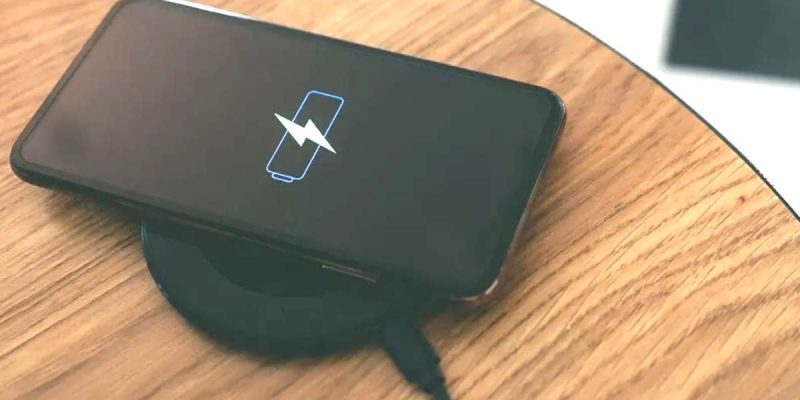
A wireless charger contains a coil that creates a small magnetic field. Your phone has a matching coil that picks up that energy and turns it into battery power. For this to work well, the two coils must line up closely, with nothing blocking the space between them.
Most Android phones use the Qi standard, which is the common wireless charging system. That means many pads work with many phones. But the details, such as power level and alignment, still matter a lot.
Fix 1: Check that your phone supports wireless charging
It sounds basic, but it is worth confirming. Not all Android phones support it, particularly budget and older models. Check your phone’s specifications on the manufacturer’s website. If wireless charging is not listed, no pad will work.
Fix 2: Line up the coils properly
This is the most common cause. If the phone is even slightly off, charging may start and stop, or not start at all. The coil is usually in the middle of the back of the phone, but not always. On some models it sits higher or lower.
Place the phone in the center of the pad and wait a few seconds. If nothing happens, shift it slowly until you see a charging icon or feel a short vibration. Many pads have a small light that changes color when charging begins. Once you find the sweet spot for your phone, remember it.
Fix 3: Remove the case, or check what it is made of
Thick cases make the gap between the coils too big. Metal plates, magnetic rings, card holders and popsockets also block or disrupt the signal. Take the case off and test again. If it charges, the case was the problem, and you may need a thinner case labeled as wireless charging compatible.
Fix 4: Use a proper power adapter
Here is a reason people miss. A wireless pad needs a good power source. If it is plugged into a weak adapter, such as an old 5-watt charger, it may charge extremely slowly or not at all. Many pads need a higher output adapter to work properly.
Use the adapter and cable that came with the pad, or check the pad’s specifications for what it needs. Do not plug it into a computer USB port and expect good results.
Fix 5: Check the cable and the pad
A damaged cable can interrupt power to the pad. Try a different cable and a different wall outlet. If you have another wireless charger available, test your phone on it. If it works there, your original pad may be faulty.
Fix 6: Clear anything between the phone and the pad
Even a small object, such as a key, coin, credit card or piece of metal, can interfere. Some pads switch off when they detect foreign objects, as a safety feature. Remove everything from the pad and the back of the phone, wipe both surfaces and try again.
Fix 7: Check your phone’s settings
Some phones have a setting to switch wireless charging on or off, or to limit it. Search your settings for wireless charging or battery. On certain phones you will find options such as fast wireless charging, which you can turn on or off. Also check that battery protection or optimized charging is not holding the charge back.
Fix 8: Restart and update your phone
If the hardware seems fine, a software glitch may be involved. Restart the phone and install any pending updates. Manufacturers often fix charging bugs this way. If the problem began after an update, look for a follow-up fix.
Fix 9: Let it cool down
Wireless charging creates more heat than wired charging. If the phone or the pad gets too warm, charging will pause until things cool off. Remove the case, avoid using the phone on the pad, and keep it in a cool room. A pad with a built-in fan can help for long charging sessions.
Why does wireless charging keep stopping and starting?
This is usually down to alignment, a thick case or a loose connection. Notifications that make the phone vibrate can also move it on the pad. Try placing it face up and turning on Do Not Disturb while it charges. If the pad has a stand design, make sure the phone sits level.
Why is wireless charging so slow?
Wireless charging is slower than good wired charging by design, since some energy is lost in the air between coils. A weak adapter, thick case or poor alignment can make it slower still. For the fastest top-up, use a cable. For overnight charging, wireless is perfectly good.
When to suspect a hardware problem
If your phone does not charge on any wireless pad, even with no case, and wired charging works, the charging coil in the phone may be faulty. This can happen after drops or water damage. A service center can confirm this. If the pad is the problem, replacing it is usually cheaper than a repair.
A quick checklist
- Confirm your phone supports wireless charging.
- Remove the case and any metal accessories.
- Center the phone and find the best position.
- Use a proper adapter and cable for the pad.
- Clear the pad of any objects.
- Check phone settings for wireless charging and battery protection.
- Restart, update and let the phone cool down.
- Test on a different pad to find where the fault lies.
What about magnetic wireless chargers?
Some newer chargers use magnets to snap the phone into the right place, which solves the alignment problem. These need a phone or case with the matching magnetic ring, and a magnetic case on a phone that is not designed for it may not line up well. If you use one, make sure your phone and case are rated for it, and do not stack extra metal plates behind the case.
Final thoughts
Wireless charging can be wonderfully convenient when it works, and mildly maddening when it does not. Most of the time, the cause is something simple, like a bad position, a thick case or a weak adapter. Work through the list, and you will probably find the reason in a few minutes.
Frequently asked questions
Why is my Android phone not charging on a wireless charger?
Common reasons include poor alignment, a thick or metal case, a weak power adapter, objects on the pad, or a setting that limits wireless charging.
Does a phone case stop wireless charging?
Thick cases and ones with metal parts or magnets can block it. A thin case marked as wireless charging compatible usually works fine.
Is wireless charging bad for my battery?
It produces more heat, and heat wears batteries faster. Keeping the phone cool and removing thick cases reduces the effect.
Why does my wireless charger get hot?
Wireless charging loses more energy as heat than a cable does. If it gets very hot, check alignment, remove the case and make sure the adapter is suitable.
Views: 0

You may also like
Is Your Android Battery Calibration Off? How to Fix Wrong Percentages
Why Your Android Phone Charges So Slowly and What Actually Fixes It

How to Use Your Phone to Learn About Nutrition Without Getting Confused
More in:Gadgets

How to Use Your Phone to Document and Share Your Creative Work

How to Use Your Phone to Prepare for a Job Interview

How to Use Your Phone to Manage Your Pet’s Health Records and Vet Visits

TecRounder is a blog that shares New Technology news from around the world (hence the name TecRounder), including the most recent mobile and gadget information: smartphone features, specifications, and more. You can find the latest technology updates here, including the most recent information on smartphones, laptop computers, and other electronic devices.