Why Is My Phone’s Speaker So Quiet? How to Make It Louder
 By
By Your phone speaker is at maximum volume and it’s still not loud enough. You can barely hear calls in a noisy street, music sounds thin, and anyone watching a video with you is struggling to make out the audio. This is a common frustration and it usually has one or more fixable causes.
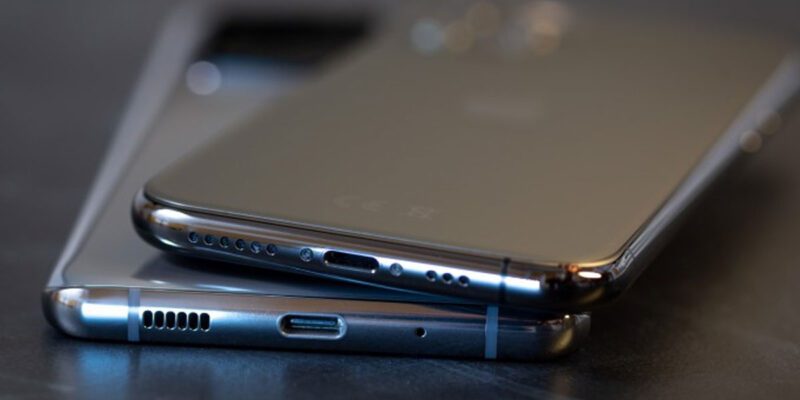
The First Thing to Check: The Speaker Grille
The most common reason phone speakers get gradually quieter is a blocked grille. The speaker grille is a row of small holes on the bottom (or sometimes bottom and top) of the phone. Pocket lint, dust, and debris accumulate in these holes over weeks and months, physically blocking the sound from coming out.
Look at the grille closely. If you can see debris in the holes, clean it out. The safest method is a clean, soft toothbrush — dry, gentle strokes across the grille to dislodge surface debris without pushing anything deeper. A dry cotton swab works for individual holes. Do not use compressed air pointing directly into the grille — it can push debris deeper and potentially damage the speaker membrane.
After cleaning, test the speaker. If the volume returns to normal, blocked grille was the cause.
Volume Limit Settings
Some phones have volume limit settings in addition to the main volume slider. These are often in the sound or accessibility settings.
On Samsung: Settings > Sounds and Vibration > Volume. Look for any limit settings.
On iPhone: Settings > Sounds & Haptics. Check the Ringer and Alerts slider is at maximum. Also go to Settings > Music > Volume Limit and make sure it’s not set lower than maximum.
On some Android phones there’s also a media volume limit: Settings > Sound > Media Volume Limit. Disable it or set it to maximum.
Check Equalizer Settings
If you’ve ever used an equalizer and adjusted it, settings that reduce certain frequencies can make audio sound quieter overall. Check Settings > Sounds > Sound Quality and Effects > Equalizer (Samsung) or whatever your phone calls its audio settings. Reset to flat/default and see if volume improves.
Mono Audio Setting
If Mono Audio is enabled in Accessibility settings, all stereo audio is mixed to a single channel. On phones with stereo speakers, this can make things sound quieter because you’re only getting half the speaker output. Check Settings > Accessibility > Hearing and disable Mono Audio if it’s on.
Third-Party Volume Booster Apps
There are legitimate audio enhancement apps that can increase the volume beyond the system default. Volume Booster GOODEV on Android is a simple option. VolumeUp and similar apps use audio processing to amplify output. These work to a degree but can introduce distortion at very high gain levels — there’s a physical limit to how loud a speaker can go.
Bluetooth Interference
If you have Bluetooth headphones or a speaker paired and connected, your phone may be sending audio to the Bluetooth device even when it’s in your pocket, which routes away from the phone speaker. Check whether a Bluetooth device is connected when the speaker sounds quiet.
Speaker Hardware Degradation
Phone speakers can degrade over time. The speaker membrane is a delicate component that can warp or weaken with heavy use, water exposure, or physical impact. If the speaker sounds distorted or crackly at high volume in addition to being quiet, this might be physical speaker damage.
The test: if cleaning the grille doesn’t help and all software settings are correct, play audio at different volume levels. A healthy speaker should sound increasingly loud as you raise the volume, up to its limit. A damaged speaker often distorts before reaching maximum, or sounds muffle at volumes where it should be clear.
Speaker replacement at a repair shop is typically $30–60 for common phone models and can restore normal volume completely.
Views: 102

You may also like
How to Use Your Phone to Learn Basic First Aid You Might Actually Need
How to Use Your Phone to Create a Morning Routine That Actually Works

How to Handle Phone Anxiety and the Constant Pressure to Be Available
More in:Gadgets
How to Use Your Phone to Plan and Track Your Garden or Allotment

How to Stop Your Kids From Spending Money on Your Phone by Accident

How to Use Your Phone to Manage Your Time When You Work From Home

TecRounder is a blog that shares New Technology news from around the world (hence the name TecRounder), including the most recent mobile and gadget information: smartphone features, specifications, and more. You can find the latest technology updates here, including the most recent information on smartphones, laptop computers, and other electronic devices.