 By
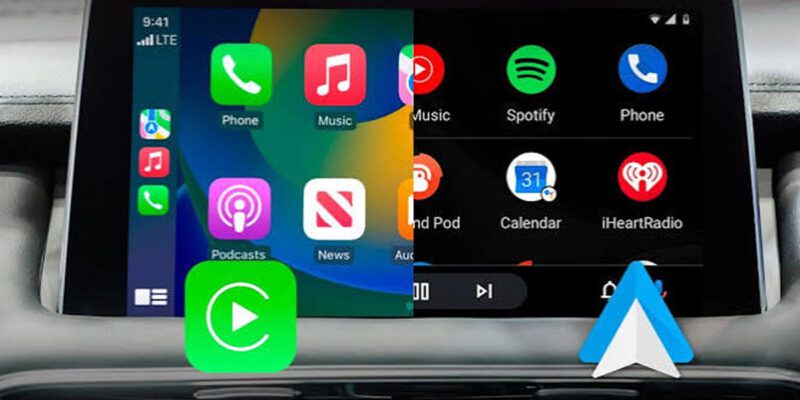
By If you have a car with a compatible head unit, using Android Auto or CarPlay transforms the experience of using your phone while driving. They’re similar in concept but have real differences in execution. Here’s an honest comparison and tips for getting the most from whichever one applies to you.
Core Difference: Voice Assistant Integration
The most meaningful difference between the two platforms is their voice assistants. Apple CarPlay uses Siri, which is well-integrated with iOS but limited in capability. Android Auto uses Google Assistant, which is significantly more capable for general queries, navigation, and controlling music. If voice control matters to you, Android Auto has the advantage.
Navigation: Both Are Excellent
Both platforms support Google Maps, Waze, and Apple Maps. On Android Auto, Google Maps and Waze run natively and feel at home. On CarPlay, Google Maps and Waze work well despite not being Apple’s own product. Apple Maps has improved dramatically and is excellent for US and UK driving. The navigation experience is effectively a tie — your preference for the mapping app matters more than the platform.
App Selection
Android Auto supports a broader range of third-party apps including more messaging and communication apps. CarPlay’s app selection has expanded but is more curated. For most users — streaming music, navigation, messaging, podcasts — both cover the essentials. Android Auto wins for breadth; CarPlay wins for simplicity and curation.
Getting More From Android Auto
Enable Coolwalk (the updated multi-panel interface) if your Android Auto supports it — it lets you see the map and now-playing media simultaneously. Use Google Assistant hands-free for navigation changes, composing messages, and skipping tracks. Enable Voice on Launch so Google Assistant activates automatically when Android Auto connects. Customize which apps appear on the home screen via Android Auto settings on your phone.
Getting More From Apple CarPlay
Customize which apps appear in your CarPlay home screen via iPhone Settings > General > CarPlay > [Your Car]. Remove apps you never use while driving. Use Siri for hands-free everything — ‘Hey Siri, send a message to [contact],’ ‘Hey Siri, navigate home,’ ‘Hey Siri, play the last episode of [podcast].’ Enable Announce Notifications so incoming messages are read aloud and you can reply without touching the screen.
Wireless vs Wired
Wireless versions of both systems are increasingly available in newer cars and via aftermarket adapters. Wireless is significantly more convenient for daily use but can occasionally have connection hiccups that wired doesn’t. For long trips, wired is more reliable. For short daily commutes, wireless is hard to go back from once you’ve used it.
Which Should You Choose?
If you already have an iPhone, CarPlay is your option. Android Auto for Android users. The question of which is ‘better’ matters less than how well you use the one that matches your phone. Both are significantly safer than using a phone directly while driving, and the voice control features are underused by most people who have them.
Views: 78

You may also like
Is Your Android Battery Calibration Off? How to Fix Wrong Percentages

Why Your Android Phone Charges So Slowly and What Actually Fixes It

How to Use Your Phone to Learn About Nutrition Without Getting Confused
More in:Apps

How to Use Your Phone to Build Better Habits That Actually Stick

How to Use Your Phone to Help You Through a Difficult Life Transition

How to Use Your Phone for Better, More Meaningful Travel Experiences

TecRounder is a blog that shares New Technology news from around the world (hence the name TecRounder), including the most recent mobile and gadget information: smartphone features, specifications, and more. You can find the latest technology updates here, including the most recent information on smartphones, laptop computers, and other electronic devices.