How to Protect Your Phone From Being Stolen — and What to Do If It Is
 By
By Phone theft is a persistent problem in most cities worldwide. London, Paris, New York, Barcelona — pickpocketing and opportunistic phone snatching happen every day, and once your phone is gone, you have a narrow window to take action. Preparation before theft makes all the difference.
Prevention: The Physical Habits
The most common phone thefts are opportunistic. Someone sees a phone sitting on a café table, unattended or in reach. Someone sees a person walking while looking at their phone, not paying attention to their surroundings. Someone on a motorbike grabs a phone from someone’s hand at a zebra crossing.
Keep your phone in a front pocket, not a back pocket or a bag that opens at the top. Be aware of your surroundings when using your phone in public spaces. In busy tourist areas and markets, keep your phone in your pocket when you’re not actively using it. At cafés, keep it on your lap or in a bag, not on the table. Don’t walk while staring at your phone in areas you’re not familiar with.
These aren’t paranoid habits — they’re the difference between keeping and losing your phone in most theft scenarios.
Preparation: The Digital Security Layer
Enable Find My Device (Android: Settings > Security > Find My Device) or Find My (iPhone: Settings > [Your Name] > Find My > Find My iPhone). These need to be set up before your phone is stolen, not after.
Enable Remote Lock. Both Android and iPhone allow you to remotely lock your device from another device or from a browser. If you know your phone has been taken, lock it immediately before thieves can access your data.
Enable Remote Erase as an option. This is the nuclear button — only use it after you’ve established the phone is truly gone and not misplaced. But having this option available prevents your personal data from being accessed.
Set a strong lock screen PIN (not biometric only — biometric can be bypassed more easily by people who have physical access to you). Enable a setting that erases the phone after ten failed PIN attempts.
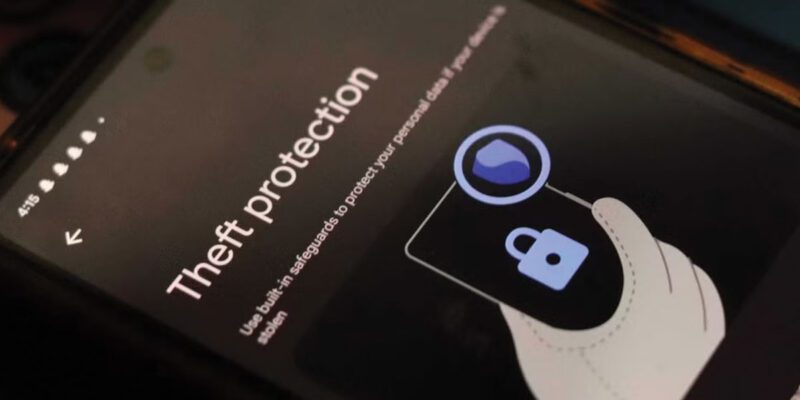
Turn on Theft Protection features. Android 10+ has an AI-based theft detection that automatically locks the phone if it detects the motion pattern of being snatched and taken. Enable this in Settings > Security > Theft Protection.
If Your Phone Is Stolen: The First 30 Minutes Matter
Use any device — a friend’s phone, a laptop — to go to android.com/find or appleid.apple.com immediately. Mark your phone as lost. This locks it and displays your contact information on the screen (so someone who finds it can contact you).
Change your Google or Apple ID password immediately. This prevents whoever has your phone from accessing your account even if they bypass the lock.
Contact your carrier and report the theft. They can suspend your SIM, preventing it being used for calls or two-factor authentication bypass. They can also provide the IMEI (serial number) of your device for police reports.
File a police report. This is necessary for insurance claims and sometimes useful for recovery if the phone is recovered in a police sweep.
Insurance and Recovery
If your phone has insurance through your carrier, home contents insurance, or a standalone policy, check the claim process and document everything immediately — date, time, location of theft, police report number.
Phone IMEI tracking: law enforcement can flag the IMEI of a stolen phone, which means if the phone is connected to a carrier anywhere, it can potentially be traced. This is more useful for organized theft recovery than opportunistic snatching, but it’s worth reporting.
The realistic outcome for a stolen phone is that you don’t get the physical device back. The goal of immediate action is to protect your data and identity, which is ultimately more valuable.
Views: 34

You may also like
How to Use Your Phone Camera to Spot Things You’d Otherwise Miss

How to Use Your Phone to Build Better Habits That Actually Stick

How to Use Your Phone to Help You Through a Difficult Life Transition
More in:Gadgets

How to Use Your Phone to Manage Your Mental Load and Stop Forgetting Things

How to Use Your Phone to Reduce Your Environmental Impact
How to Use Your Phone to Make Better Decisions

TecRounder is a blog that shares New Technology news from around the world (hence the name TecRounder), including the most recent mobile and gadget information: smartphone features, specifications, and more. You can find the latest technology updates here, including the most recent information on smartphones, laptop computers, and other electronic devices.