 By
By A home inventory — a documented record of your possessions with photos and estimated values — is one of those things everyone should have and almost nobody does, until they need it. If your home is burgled, floods, or burns, an insurance claim is dramatically faster and more complete when you have photographic evidence of what you owned. Without it, you’re trying to remember everything from memory under stressful circumstances, and you’ll inevitably forget things worth money.
Creating one with your phone takes about two hours and then 10 minutes annually to update.
Why Most People Don’t Have One (And Why That’s Changing)
Creating a home inventory used to be tedious — photographing each item, typing descriptions, building a spreadsheet. Modern apps automate most of this, and using your phone’s camera makes the photo documentation quick.
The main motivation to do this: your homeowner’s or renter’s insurance likely covers your contents, but claims require evidence. The more evidence you have, the less you can be argued with.
The Video Walkthrough Approach
The fastest starting point: do a single slow video walkthrough of your entire home narrating as you go. “This is the living room. The television is a Samsung 65-inch QLED purchased in 2023. The sofa and armchairs are from [brand]. There are several art prints on the walls, and this bookshelf contains [general description of contents].”
This video, saved to Google Photos or iCloud, timestamped by the platform, is evidence that you owned these items before the date of any claim. It takes about 20 minutes to do for an average home and requires no app.
The Detailed Approach With Apps
For more comprehensive documentation, apps make the process systematic:
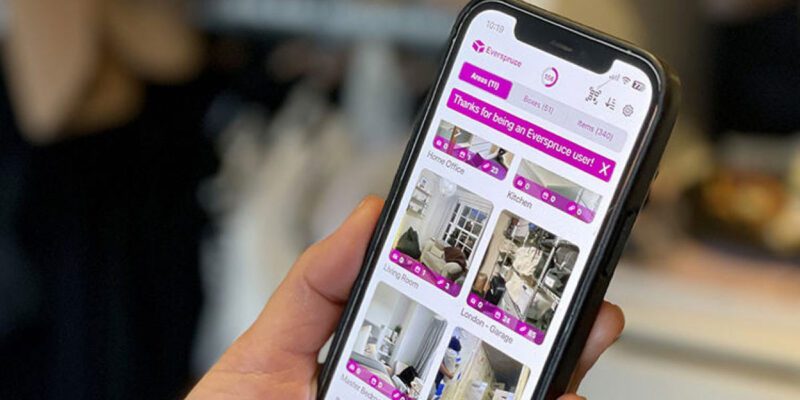
Encircle is specifically designed for home inventory documentation. You photograph rooms and items, and the app helps you document values and categories. It generates a PDF report suitable for insurance purposes.
Sortly is another well-regarded home inventory app with photo documentation, QR code labels, and value tracking.
Magic Home Inventory (previously named Home Contents) is simple and widely used.
All of these have free tiers that cover most home inventory needs.
What to Document in Detail
Electronics: photograph the front, the back (with serial number visible), and the receipt or packaging if you have it. Serial numbers are critical for electronics insurance claims and for police reports if items are stolen.
Jewellery and valuables: photograph with something for scale and note approximate value. Professional valuation documentation for significant pieces.
Clothing and general household contents: a room-by-room video is sufficient for these — you don’t need individual photos of every item of clothing, but covering your wardrobe in the room video documents that it exists.
Furniture: room photos capture this naturally.
Art and collectibles: individual photos plus any provenance documentation, appraisals, or purchase receipts.
Storing the Documentation
Store the photos and documentation somewhere that survives a home loss: cloud storage (Google Drive, iCloud, Dropbox) rather than just on the phone or a local hard drive that could be in the same fire or flood as what it’s documenting.
Send a copy to a trusted person outside your home — a family member or close friend — as an additional backup.
Annual Update
Set a calendar reminder for the anniversary of doing your inventory. Spend 30 minutes documenting significant purchases from the past year: new electronics, furniture, appliances, gifts received. Delete items you no longer own. Keep the inventory current.
The two-hour initial investment and the 30-minute annual update are small compared to the protection they provide if you ever need to make a claim.
Views: 17

You may also like
Is Your Android Battery Calibration Off? How to Fix Wrong Percentages

Why Your Android Phone Charges So Slowly and What Actually Fixes It

How to Use Your Phone to Learn About Nutrition Without Getting Confused
More in:Apps

How to Use Your Phone to Build Better Habits That Actually Stick

How to Use Your Phone to Help You Through a Difficult Life Transition

How to Use Your Phone for Better, More Meaningful Travel Experiences

TecRounder is a blog that shares New Technology news from around the world (hence the name TecRounder), including the most recent mobile and gadget information: smartphone features, specifications, and more. You can find the latest technology updates here, including the most recent information on smartphones, laptop computers, and other electronic devices.