How to Fix Common Problems With Wireless Earbuds and Your Phone
 By
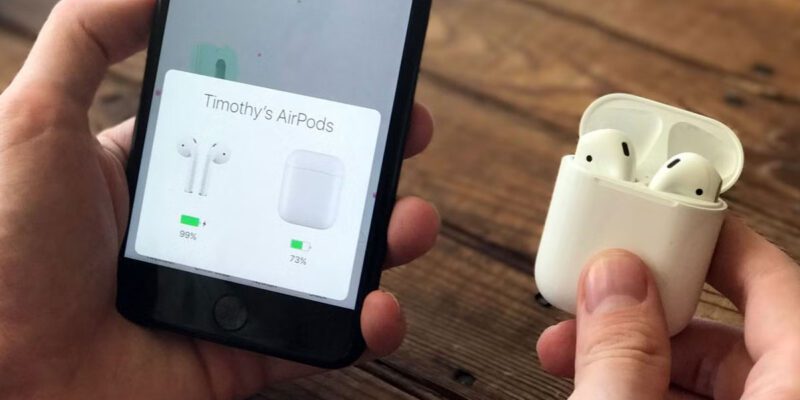
By Wireless earbuds have an impressive array of ways to misbehave. One side stops working. They connect to the wrong device. The audio cuts out constantly. They won’t charge. The noise cancellation sounds weird. These problems are maddening when you’re just trying to listen to something, and the solutions aren’t always obvious.
Here’s a systematic guide to fixing the most common issues.
One Earbud Not Working
This is the most frequently reported problem with wireless earbuds and usually has one of three causes.
Battery imbalance: if the left and right buds have significantly different battery levels, the lower one may not power up properly. Place both in the case for 30 minutes, then try again.
Pairing issue: the two earbuds sync with each other as well as with your phone. Sometimes one loses sync with the other. Reset the earbuds by holding the pairing button on both simultaneously (or using the manufacturer’s app to reset). Remove the existing pairing from your phone. Pair fresh.
Audio channel issue: if only one side has sound while the other is silent, check the audio balance setting on your phone. Settings > Accessibility > Audio/Visual > Balance — if the slider is not centred, you’ll get more audio in one ear. Centre it.
They Won’t Connect or Keep Disconnecting
Remove the pairing from your phone completely (Settings > Bluetooth > forget the device). Remove the pairing from the earbuds’ memory (reset them per manufacturer instructions, usually long-pressing both for 10+ seconds until lights flash a specific pattern). Pair fresh. This resolves most connection instability.
Check that no other device nearby is actively connected to the earbuds. Most earbuds can pair with multiple devices but connect to one at a time — if they’re auto-connecting to a laptop you’re not currently using, your phone can’t connect.
Audio Cutting Out
Bluetooth range and interference issues: too much distance from the phone or objects between phone and earbuds (your body included — the signal path from phone in pocket to earbuds can go through your torso) reduces signal. Keep the phone closer or on the same side of your body as the earbuds.
Codec mismatch: in Developer Options on Android (under Bluetooth), change the audio codec to SBC if other codecs (LDAC, aptX) are causing instability. SBC is the most stable universal codec.
Other 2.4GHz interference: Wi-Fi and Bluetooth share the 2.4GHz frequency range. In environments with many Wi-Fi networks (offices, apartments), interference can cause audio dropouts. Not much you can do here besides moving to a less congested area or ensuring the phone is as close to the earbuds as possible.
Earbuds Won’t Charge
Check the case contacts: small metal contacts in the case must connect with contacts on the earbuds. Clean both with a dry cotton swab. Any debris or oxidation on the contacts prevents charging.
Check that the earbuds are seated correctly in the case. Many cases require a specific orientation (click into place) for charging to work.
Charge the case itself: if the case battery is depleted, it can’t charge the earbuds. Plug the case in first.
Noise Cancellation Sounds Wrong
If active noise cancellation (ANC) sounds muffled, produces a strange pressure sensation, or makes your own voice sound odd, you’ve likely enabled wind noise reduction or transparency mode accidentally. Check the companion app for which mode is active.
Also check eartip fit: if the seal between eartip and ear canal isn’t good, ANC functions poorly because external sound leaks in around the poor seal. Try different eartip sizes (most earbuds include multiple).
When Factory Reset Is the Answer
For earbuds with persistent, unexplained problems — refusing to pair, constant connection drops, stuck in a weird mode — a factory reset via the companion app (or the physical button sequence in the manual) returns them to out-of-box state. Pair fresh. Most persistent firmware and pairing bugs are resolved by this.
Views: 0

You may also like

How to Get the Most From Your Phone’s Built-In Health and Fitness Tracking
Why You Should Stop Deleting Apps When Your Phone Is Slow
How to Use Your Phone to Manage Your Email Without Drowning in It
More in:Gadgets

How to Use Your Phone to Find the Best Deals and Save Money Shopping
How to Use Your Phone to Stay Organised When Life Gets Overwhelming

How to Use Your Phone to Manage Your Career and Job Search

TecRounder is a blog that shares New Technology news from around the world (hence the name TecRounder), including the most recent mobile and gadget information: smartphone features, specifications, and more. You can find the latest technology updates here, including the most recent information on smartphones, laptop computers, and other electronic devices.