GadgetsTechnology
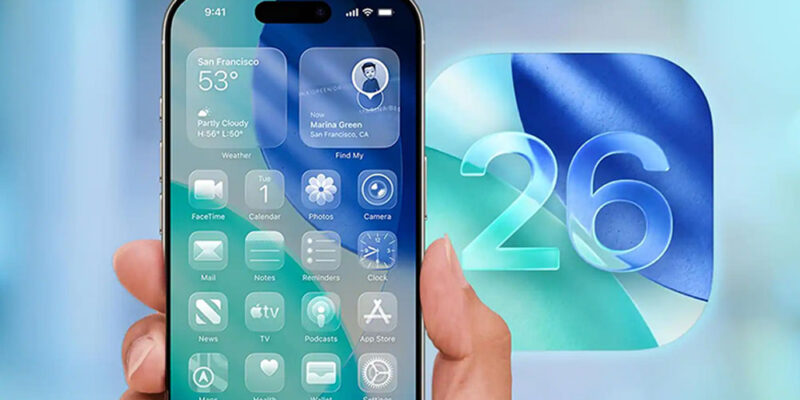
iOS 26.3 is currently being rolled out. Here’s Everything New You Can Expect on Your iPhone
 By
By Apple’s most recent iPhone update focuses on making it easier to switch to Android, adding new privacy options, refreshing wallpapers, and making minor system improvements.
Apple has released iOS 26.3 to the general public, a rather minor update that prioritises refinement and infrastructure over exciting new features. The upgrade comes after last week’s release candidate, which normally indicates that Apple is almost ready to roll out its latest software to a wider audience.
Rather than a dramatic redesign, iOS 26.3 includes a new mechanism for moving from iPhone to Android, a privacy feature that limits the information your phone shares, minor wallpaper modifications, and a few interface tweaks.
Here’s what you can start using right away with iOS 26.3.
Easier to go from iPhone to Android
Another change in iOS 26.3 is a simple way to transfer data from an iPhone to an Android device.
If you’ve pondered switching from iPhone to Android, you may have been put off by the transfer process. Android provides a five-step approach to make this move simple, although some steps entail preparing your device by turning off FaceTime and Messages and connecting both devices via cable.
iOS 26.3 introduces a new option for connecting your iPhone and Android devices.
Navigate to Settings > General > Transfer/Reset iPhone. Near the bottom of this page, there is a Transfer to Android option. Tap here and follow the on-screen directions to transfer images, texts, apps, and other content to your Android device. This function allows you to position your iPhone near a compatible Android smartphone and wirelessly transfer a variety of data, such as images, messages, contacts, and more, with no third-party software necessary.
Another privacy setting that restricts what your phone shares.
The most recent version also increases privacy options with a new Limit Precise position setting, which limits how exactly your position is shared with cellular networks, allowing you greater control over what data carriers receive.
When enabled (Settings > Cellular/Cellular Data Options), your carrier may only get general location information (such as your neighbourhood rather than your particular street address), but emergency services like 911 continue to operate normally. For the time being, the function is only accessible on the iPhone Air and iPhone 16e, and it is supported exclusively by Boost Mobile in the United States.
In addition to location controls, Apple has made minor interface improvements to the privacy section of the Settings app, making it easier to understand and handle privacy-related items like app permissions and data sharing. These minor changes assist in highlighting privacy trusts without adding unnecessary clutter.
New backgrounds and visual improvements, including weather and astronomy.
iOS 26.3 expands the categories and introduces additional presets for wallpapers for the iPhone. The update organises topics such as Weather and Astronomy into discrete rows in the wallpaper collection, making it easier to browse and install wallpapers matched to various themes. The Weather area now features a variety of live weather wallpapers that match local circumstances, as well as new typefaces and widget layouts.
These are only a few of the new features available as of iOS 26.3’s public release. There are also several minor UI modifications and under-the-hood changes that will not grab much attention but are intended to provide a slightly smoother iPhone experience.
What is Apple still working on?
Apple is also building the groundwork for upcoming features. During the iOS 26.3 developer beta cycle, Apple revealed early support for third-party accessory notification forwarding, while outside developers discovered references to carrier infrastructure in the code, sparking rumours about future support for encrypted RCS communications. These changes enable developers and partners to begin developing support for accessories and carrier systems, neither capability is available to users in the public release of iOS 26.3. These features are expected to appear in a later release.
For additional iOS news, see everything you need to know about iOS 26.2, the new features in iOS 26.1, and my review of iOS 26. You can also view our iOS 26 cheat sheet.
Views: 71

You may also like
Technology
What indications suggest about a potential Windows 12
According to several rumours, Windows 12 will replace Windows 11 in 2026. We explain the ...
Gadgets
Android Circuit: Honor’s MWC Robot, Galaxy Unpacked Recap, and OnePlus 15T Confirmed
Taking a look back at this week’s news and headlines in the Android world, including ...
Gadgets
A First Look at Samsung’s Galaxy S26 Series: The Most Intuitive AI Phone Yet
Samsung Electronics revealed the Galaxy S26 series on February 25th at Galaxy Unpacked 2026 in ...
More in:Gadgets

Apps
God of War Greek trilogy remake is in progress, and God of War Sons of Sparta is available now.
God of War was released on the PlayStation 2 more than two decades ago, in ...
Gadgets
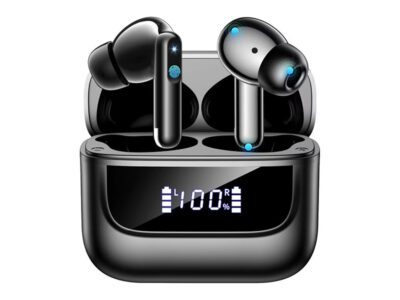
Amazon offers $160 noise-cancelling earbuds for $22.
Why do we adore this deal? It appears that most of us rarely go a ...

Apps
Check your mail: You may have received a payment as part of a $95 million Apple settlement.
Last year, Apple agreed to pay $95 million in a lawsuit alleging “unlawful and intentional ...

TecRounder is a blog that shares New Technology news from around the world (hence the name TecRounder), including the most recent mobile and gadget information: smartphone features, specifications, and more. You can find the latest technology updates here, including the most recent information on smartphones, laptop computers, and other electronic devices.